
Amazon Keyword Research: Complete Guide (2026)
Contents expand_more
Introduction
Your competitor is stealing your customers with better Amazon keyword research.
They launched the same product three weeks after you. Their listing is on page one while yours is buried on page seven. The difference is not product quality or price. It is the words in the listing. This article provides a complete, efficient Amazon keyword research process. You will learn exactly what keyword research is, why it determines your listing’s success, where to find high-converting keywords using free and paid methods, how to assess keyword quality using a four-point validation framework, and where to place keywords in your listing for maximum impact.
What Is Amazon Keyword Research and Why Does It Matter?
Page seven does not pay your bills.
Amazon keyword research is the systematic process of identifying the specific words and phrases customers type into the Amazon search bar when looking for products like yours, then incorporating those terms strategically into your product listing to improve search visibility and conversion rates. When you create or optimise a listing without keyword research, you are guessing at what customers search for.
You may call your product a “water bottle”, but if 80% of customers search for “insulated thermal bottle”, your listing will not appear in the results. Amazon’s A9 algorithm matches search queries to listings based on keyword relevance. If the words customers search for do not exist in your title, bullets, description or backend keywords, Amazon will not show your product.
Keyword research matters because visibility drives sales. A product ranked on page one for a high-volume keyword receives exponentially more clicks than a product on page three. According to Amazon’s own data, the top three organic positions capture approximately 64% of all clicks for a given search term. Moving from position ten to position three can double or triple your daily sales without changing your product or price.
Beyond initial visibility, proper keyword research improves your listing’s conversion rate. When your title and bullets use the exact language customers are searching for, the listing feels immediately relevant. This relevance builds trust and reduces bounce rates, which signals to Amazon that your listing satisfies the searcher’s intent. The algorithm responds by ranking you higher over time, creating a compounding visibility advantage.
The research process requires an initial investment of time (2-12 hours depending on your approach and tools), but it is a one-time investment per product with monthly maintenance. The alternative is running Amazon PPC campaigns blindly without knowing which keywords actually convert, which costs far more in wasted advertising spend than the time investment in research.
The Amazon Keyword Research Process in Three Stages
Start broad. Narrow strategically.
Amazon keyword research follows a funnel structure: begin with brainstorming, narrow down using data validation, then prioritise strategically for implementation.
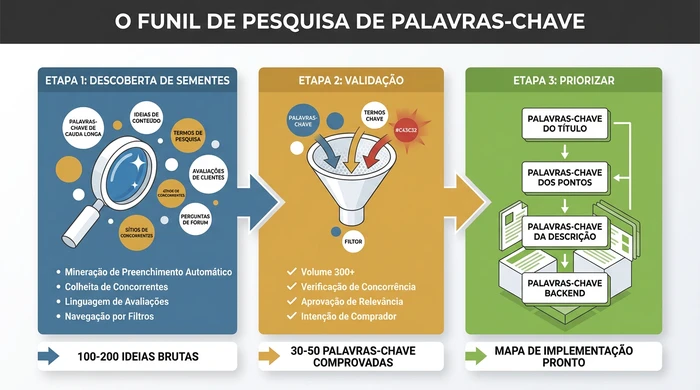
The three-stage keyword research funnel turns 100+ raw ideas into a prioritised implementation map.
Stage 1: Seed Discovery (100+ Raw Keywords)
Volume beats perfection here.
Your goal at this stage is to generate as many relevant keyword ideas as possible without filtering. You will validate them in stage two.
Amazon Search Bar Autocomplete: Start typing your product category into the Amazon search bar. Amazon automatically fills in the most frequently searched terms in real time. For example, typing “yoga mat” reveals suggestions like “thick yoga mat”, “yoga mat with alignment lines” and “non-slip yoga mat”. Record every suggestion related to your product. Repeat this for 10-15 related seed terms (yoga mat, exercise mat, fitness mat).
Competitor Listing Harvesting: Find the top 5-10 competitors ranked on page one for your main category keyword. Copy the full title, bullets and description into a document. Highlight repeated terms and phrases. Well-ranked competitors have already done keyword research. You are not copying their listings, you are identifying which terms Amazon’s algorithm has validated as relevant for your category.
Customer Review Mining: Read 20-30 reviews on top competitors’ products. Customers use different language from sellers. They may call a feature “non-slip” while you call it “slip-resistant”. They may search for “travel yoga mat” while you think of it as “foldable”. Record the exact phrases customers use to describe benefits, problems and use cases.
Category and Filter Browsing: Navigate to your product category on Amazon. Look at the filter options in the left-hand sidebar. Amazon presents these filters because customers use them frequently. Terms like “BPA-free”, “dishwasher safe” or “organic” are searchable keywords. Record relevant filter terms.
Plurals and Variations: For each seed keyword, create variations: singular/plural (yoga mat/yoga mats), spelling variations and synonym variations (water bottle/flask/hydration bottle). Amazon treats these as separate keywords in most cases.
By the end of stage one, you should have 100-200 raw keyword ideas in a spreadsheet. Many will be irrelevant or low-volume. That is expected. Stage two filters them out.
Stage 2: Volume Validation (30-50 Proven Keywords)
Data separates opportunity from waste.
Now you apply data to determine which of the stage-one keywords are worth targeting.
Search Volume Assessment: Use Amazon’s free tools (covered in the next section) to assess the estimated monthly search volume for each keyword. Product Opportunity Explorer provides official volume data in ranges. For sellers without brand registry, competitor analysis of search results (number of competing products, review counts) indicates relative volume. Look for keywords with at least 300-500 monthly searches. Lower volume is acceptable for long-tail keywords if they are highly relevant.
Competition Assessment: High search volume means nothing if 500 established brands dominate page one. For each keyword, search it on Amazon and assess the top 10 results. Ask: Are these listings from major brands with more than 10,000 reviews? Are they sponsored adverts or organic results? Is there any listing on page one with fewer than 100 reviews? If all the results are from major brands with more than 5,000 reviews, you probably cannot rank organically for that keyword as a new seller. Flag it for future PPC use only.
Relevance Filtering: Remove keywords that do not accurately describe your product. If you sell a 700ml stainless steel water bottle, the keyword “glass water bottle” has high volume but zero relevance. Using irrelevant keywords harms your conversion rate and Amazon will stop showing your listing for those terms over time.
Intent Alignment: Not every search indicates purchase intent. The keyword “how to clean a yoga mat” has search volume but represents informational intent, not buying intent. Focus on keywords where the searcher is likely ready to buy: product type + feature (insulated water bottle), product type + use case (yoga mat for hot yoga), product type + material (stainless steel cup).
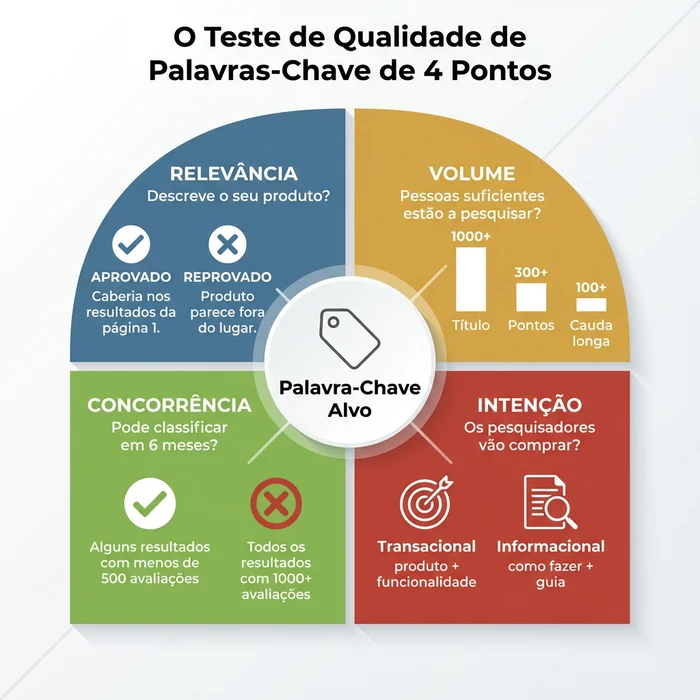
Apply the four-point quality test to every keyword:
- Relevance: Does this term accurately describe my product?
- Volume: Do at least 300+ people search this monthly?
- Competition: Can I realistically rank on page one within 3-6 months?
- Intent: Will searchers using this term be ready to buy?
Keywords that pass all four tests advance to stage three. You should end up with 30-50 validated keywords.
Stage 3: Strategic Prioritisation (Organised Implementation Map)
Placement is not equal. Amazon has favourites.
You have validated keywords, but not all placements are equal. Amazon assigns different weights to keyword placement.
Title Keywords (Maximum Priority): Your product title is the most powerful ranking signal. Place your 1-2 highest-volume, most relevant keywords here. Amazon recommends keeping titles under 200 characters, but more importantly, the first 80 characters appear in mobile search results. Put your primary keyword at the beginning.
Bullet Point Keywords (Secondary Priority): Integrate 5-10 secondary keywords naturally into your bullets. Do not stuff keywords. Each bullet should communicate a benefit while incorporating a keyword. Example: “Leak-proof lid with one-handed opening design keeps your bag dry during commutes” targets “leak-proof” and “one-handed” while remaining readable.
Description Keywords (Tertiary Priority): Use long-tail keyword variations and contextual terms here. The description carries less ranking weight than the title and bullets, but still contributes to indexing. It also helps conversions by answering detailed questions.
Backend Search Terms (Character Limit Optimisation): Amazon gives you 250 bytes (not characters, bytes) for hidden backend keywords. Use this space for relevant terms that did not fit naturally into your visible content: alternative spellings, abbreviations, synonyms. Do not repeat keywords already in your title or bullets; Amazon indexes them automatically. Do not use competitor brand names (it violates Amazon’s Terms of Service). Separate terms with spaces, not commas.
Create a keyword map document with four columns: Keyword, Search Volume, Priority (High/Medium/Low) and Placement (Title/Bullets/Description/Backend). This becomes your implementation checklist.
Where to Find Amazon Keywords: Free Tools
Several free, effective tools are available.
Amazon provides powerful native tools for keyword research that deliver complete results at no additional cost. Here is an assessment of your options.
Free Tools and Methods
Amazon Search Bar Autocomplete: Already covered in stage one. This is official Amazon data on what customers search for. It is free, accurate and updated in real time. Limitation: You get suggestions but no search volume data or competition metrics.
Amazon Product Opportunity Explorer: Available to sellers with brand registry in Seller Central under Brands > Product Opportunity Explorer. Shows search volume ranges, click share and conversion share for keywords and niches. This is official Amazon keyword data. Limitation: Requires brand registry (which in turn requires a registered trademark, adding cost and time). Data is aggregated into ranges (e.g. 10K-100K searches) rather than precise numbers.
Amazon Search Query Performance Dashboard: Available to sellers with active listings. Shows which keywords customers used to find your product over the last 90 days. Limitation: Only works after your listing exists and receives traffic, so it is useful for optimisation but not for pre-launch research.
Competitor Listing Analysis: Manual method covered earlier. Completely free, highly accurate for relevance, but time-intensive and provides no volume data.
Time Investment for Free Tools: Expect to spend 8-12 hours on initial research using free methods. Monthly maintenance adds 2-4 hours.
Free Tool Usage Strategy
Maximise the free resources with this approach:
- Always start with Amazon autocomplete to discover actual search terms customers use.
- If you have brand registry, Product Opportunity Explorer is your primary tool for Amazon-validated volume data.
- Use the Search Query Performance Dashboard after launch for ongoing optimisation based on real traffic data.
- Combine manual competitor analysis with review mining to identify customer language and keyword variations.
- For highly competitive categories, dedicate extra time to in-depth competitor analysis and seasonal search pattern study.
The free methods provide all the data you need to build a solid, competitive keyword strategy, provided you invest the appropriate time in research and analysis.
The Keyword Research Decision Matrix
Use this framework to choose your research approach based on time and budget constraints:
| Your Situation | Recommended Approach | Tools to Use | Time Required | Expected Outcome |
|---|---|---|---|---|
| New seller, first product, limited start-up budget | Quick Start Method | Amazon autocomplete + competitor analysis + Product Opportunity Explorer (if with brand registry) | 2-4 hours | 15-20 solid keywords, enough to launch and iterate |
| 1-3 active products, growing consistently | Systematic Method | Product Opportunity Explorer + in-depth competitor analysis + review mining + Search Query Performance Dashboard | 6-8 hours | 30-40 validated keywords with contextual data, strong competitive positioning |
| 5+ products or monthly revenue over 10,000 EUR | Comprehensive Method | All free Amazon tools + cross-analysis of multiple competitors + seasonal trend tracking | 8-12 hours per product | 50+ keywords including long-tail opportunities, complete competitive intelligence based on real Amazon data |
| Selling in a highly competitive category (supplements, beauty, electronics) | Advanced Method | Product Opportunity Explorer + detailed top-20 competitor analysis + deep review mining + monthly trend tracking | 10-15 hours initially, 4-6 hours monthly update | Complete keyword coverage including emerging trends and seasonal opportunities identified through rigorous analysis |
| KDP authors (book publishing) | KDP-Specific Method | Amazon autocomplete + analysis of successful books in the genre + browsing category study | 3-4 hours | 7 keywords (KDP limit) optimised for both search and category placement through competitor analysis |
How to Use This Matrix:
- Find the row matching your current business situation
- Follow the recommended approach and tool combination
- Set aside the indicated time (block it in your calendar like a meeting)
- Your outcome is the level of keyword quantity and quality you can realistically expect
This framework eliminates decision paralysis. You know exactly what to do based on where you are now.
How to Assess Keyword Quality: The 4-Point Test
Most do not deserve your listing.
You have a list of potential keywords. Not all are worth targeting. Apply this filter to every keyword before adding it to your listing.
Every keyword must pass all four criteria before earning a place in your listing.
Test 1: Relevance (Pass/Fail)
Does it accurately describe your product?
Search the keyword on Amazon. Look at the top 10 results. If your product would look out of place among those results, the keyword fails relevance. Example: You sell an insulated stainless steel tumbler. The keyword “coffee mug” has high volume, but the search results show ceramic mugs with handles. Your tumbler is not a mug. Failed.
Relevance is binary. A keyword either describes your product or it does not. If in doubt, ask: “Would a customer searching this term be satisfied to find my product?” If the answer is not a clear yes, skip it.
Test 2: Volume (Minimum Threshold)
Are enough people searching?
For primary keywords (title placement): 1,000+ monthly searches minimum For secondary keywords (bullets, description): 300+ monthly searches minimum For long-tail keywords (backend, niche targeting): 100+ monthly searches acceptable if highly relevant and low competition
Volume thresholds vary by category. Niche categories (such as specialised industrial equipment) have lower overall search volumes. Adjust thresholds proportionally. The goal is to ensure the keyword represents real customer demand, not just a phrase you think sounds good.
Test 3: Competition (Reality Check)
Can you rank within 6 months?
Search the keyword on Amazon. Analyse the first-page results:
Warning Signs (Skip or PPC Only):
- All results have more than 1,000 reviews
- All results are from major recognisable brands (Yeti, OtterBox, Anker)
- All results are sponsored adverts with no organic results on page one
- Category dominated by Amazon’s Choice or Amazon Basics
Green Signs (Target Organically):
- Mixed review counts (some with fewer than 500 reviews ranking on page one)
- Mix of established and newer brands
- At least 2-3 organic results on page one
- You can match or beat the quality/images/price of page-one listings
Competition assessment is not about avoiding competitive keywords entirely. It is about being realistic. If you are a new seller with a generic product entering a saturated category, ranking organically for “yoga mat” (ultra-competitive) within 6 months is unlikely. But “yoga mat with carry strap” (more specific, less competition) is achievable.
Test 4: Intent (Buyer Readiness)
Will they buy?
Keywords fall into four intent categories:
Informational Intent: “how to choose a yoga mat”, “yoga mat thickness guide” - The searcher is researching, not buying. Skip for product listings (these keywords work for blog content, not Amazon listings).
Navigational Intent: “Lululemon yoga mat”, “Manduka Pro review” - The searcher wants a specific brand. Only target if it is YOUR brand. Never use competitor brand names in your listing (Terms of Service violation).
Investigation Intent: “best yoga mat for beginners”, “yoga mat comparison” - The searcher is evaluating options. Medium purchase intent. Good for PPC, weak for organic SEO because the searcher has not yet decided on specific features.
Transactional Intent: “buy yoga mat”, “extra thick yoga mat”, “non-slip yoga mat” - The searcher knows what they want and is ready to buy. Maximum priority for listings. These convert.
Focus on transactional-intent keywords. They generate revenue. The others generate traffic that does not convert, which harms your listing’s performance metrics over time.
Applying the 4-Point Test:
Create a spreadsheet with columns for each test. For every keyword, mark Pass/Fail for Relevance, the actual volume number, a Competition score (Low/Medium/High) and the Intent category. Filter to show only keywords that pass Relevance + meet the Volume threshold + have Low or Medium competition + show Transactional intent.
Those are your target keywords.
Where to Place Keywords in Your Amazon Listing
Amazon does not treat all real estate equally.
You have validated keywords. Placement determines whether Amazon indexes them and how much ranking weight they receive.
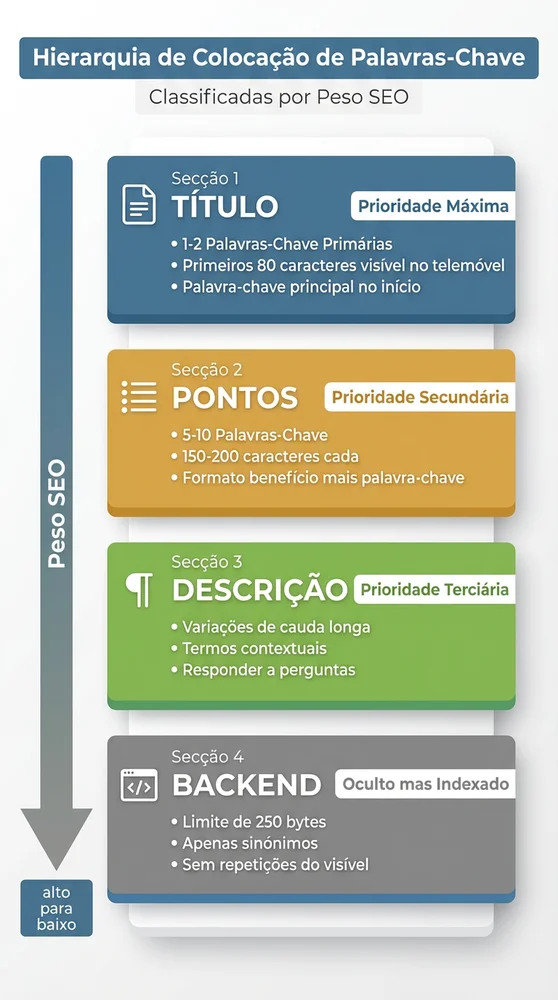
Amazon assigns different weights to keyword placement, with title keywords receiving the strongest ranking signal.
Title (Maximum Ranking Weight)
Amazon’s algorithm prioritises title keywords above all others. Your title should include your primary keyword within the first 80 characters (mobile search limit) and follow Amazon’s category-specific formatting guidelines.
Example (Water Bottle Category): Insulated Water Bottle with Straw, 1L Stainless Steel Leak-Proof for Sports, Gym, Travel
Breakdown:
- Primary keyword: “Insulated Water Bottle” (at the beginning)
- Feature: “with Straw” (differentiator + secondary keyword)
- Specification: “1L Stainless Steel” (volume data)
- Use cases: “Sports, Gym, Travel” (captures related search terms)
Title Rules:
- Do not exceed 200 characters (Amazon truncates, and some categories have lower limits)
- Place your highest-priority keyword at the beginning
- Include numbers/specifications customers search for (litres, pack quantity, size)
- Use natural language; avoid keyword stuffing that makes the title unreadable
- Do not use all caps, promotional language (BEST, No.1) or special characters
Amazon’s title guidelines vary by category. Check Seller Central > Inventory > Product Detail Page Rules for your specific category before finalising.
Bullets (Secondary Ranking Weight + Conversion)
Bullets serve two purposes: they help Amazon index secondary keywords and convince buyers to purchase. Balance keyword optimisation with readability.
Bullet Structure: [BENEFIT HEADLINE]: Specific explanation of the feature including a keyword naturally
Example: LEAK-PROOF DOUBLE-WALL INSULATION: Stainless steel construction with vacuum sealing keeps drinks cold for 24 hours or hot for 12 hours, perfect for long workdays, car journeys and outdoor adventures. The secure screw-top lid prevents spills in your bag.
This bullet targets keywords: “leak-proof”, “double-wall insulation”, “vacuum sealing”, “stainless steel”, “keeps drinks cold”, while remaining readable and benefit-focused.
Bullet Best Practices:
- Write 5 bullets (Amazon displays up to 5 in most categories)
- Each bullet: 150-200 characters for optimal mobile display
- Start with a keyword or benefit phrase in capital letters
- Include 1-2 secondary keywords per bullet, integrated naturally
- Focus on customer benefits, not just features (do not say “stainless steel”, say “dent-resistant stainless steel that lasts for years”)
- Address customer objections (concerns about size, compatibility, durability)
Product Description (Tertiary Ranking Weight + Enhanced Content)
The description section carries less SEO weight than the title and bullets, but Amazon still indexes these keywords. Use this space for long-tail keyword variations and detailed context.
Description Strategy:
- Expand on bullets with additional detail
- Use long-tail variations (if the title says “yoga mat”, the description can say “exercise mat for home workouts”)
- Answer common customer questions
- Include dimensions, materials, care instructions (searchable terms)
- Write for humans first; Amazon’s algorithm rewards readability
For sellers with brand registry, A+ Content replaces the standard description. A+ Content uses images and formatted layouts. You can still incorporate keywords into text modules, but prioritise visual storytelling over keyword density.
Backend Search Terms (Hidden but Indexed)
Backend keywords are invisible to customers but Amazon indexes them for search. You have 250 bytes in total (one byte per character in most cases, but special characters may use more).
Backend Keyword Rules:
- Do not repeat keywords already in the title, bullets or description (wastes space; Amazon indexes them automatically)
- Use synonyms, alternative spellings, abbreviations (water bottle / flask / hydration bottle)
- Include relevant terms that did not fit naturally into visible content
- Separate terms with spaces, not commas or semicolons
- Do not include competitor brand names (Terms of Service violation, may result in listing suspension)
- Do not include misleading terms (if your bottle is not glass, do not put “glass” in the backend)
- Ignore plurals if you already have the singular (Amazon indexes both automatically)
Backend Keyword Example for a Water Bottle: flask thermal bottle vacuum insulated BPA free dishwasher safe reusable gym training hiking camping cycling office
Note: No commas, no words repeated from the title, focused on synonyms and relevant use-case terms.
Common Amazon Keyword Research Mistakes and How to Avoid Them
Most sabotage their own rankings.
Even with the right process, sellers make predictable mistakes that harm rankings and waste time.
Mistake 1: Keyword Stuffing Cramming every possible keyword into your title and bullets makes your listing unreadable. Amazon’s algorithm has evolved to penalise listings with poor readability because they convert badly. Customers bounce, Amazon stops showing your listing.
Solution: Use keywords naturally. If a keyword does not fit into a coherent sentence that communicates value, save it for the backend.
Mistake 2: Ignoring Amazon’s Native Data Sellers jump to complex methods before exploring Amazon’s free resources. Product Opportunity Explorer and Search Query Performance provide real Amazon data, validated directly by the search system.
Solution: Always start with Amazon’s native tools. This official data is more accurate and relevant than any external estimate.
Mistake 3: Researching Once and Never Updating Customer search behaviour changes. Seasonal trends shift. Competitors launch new products with new keywords. Your initial keyword research becomes outdated within 6-12 months.
Solution: Schedule monthly reviews of your Search Query Performance dashboard. Identify new keywords customers use to find your product and add them to your listing. Quarterly, run a full keyword research refresh using your original process.
Mistake 4: Copying Competitor Keywords Blindly Just because a competitor ranks for a keyword does not mean it is a good keyword or that they target it intentionally. They may be ranking accidentally, or their listing may be performing badly.
Solution: Use competitor keywords as starting points for research, not final decisions. Validate every keyword with the 4-point quality test.
Mistake 5: Targeting Only High-Volume Keywords Beginners chase keywords with more than 50,000 monthly searches. Those keywords have intense competition. You cannot rank for them organically as a new seller.
Solution: Build a keyword portfolio: 20% competitive high-volume keywords (for future PPC), 50% medium-volume keywords with moderate competition (for organic ranking), 30% low-competition long-tail keywords (for initial sales and niche targeting).
Mistake 6: Forgetting Mobile Search More than 70% of Amazon shoppers use mobile devices. Your title is truncated to 80 characters on mobile. If your primary keyword is at character 120, mobile shoppers never see it.
Solution: Place the primary keyword at the beginning of the title. Put the most important keyword within the first 80 characters.
Variations and Exceptions: When Standard Keyword Research Does Not Apply
One size does not fit all.
The process described above works for most Amazon sellers, but specific situations require adjustments.
KDP Authors (Book Publishing)
Kindle Direct Publishing allows only 7 keywords in total, not 250 bytes. Keywords work differently: they determine category placement as much as search visibility.
KDP Keyword Strategy: Research category-specific keywords through analysing successful books in your genre on Amazon. Note the categories where they appear and the terms they use in titles. Use keyword phrases that trigger specific browsing categories (e.g. “cosy small-town mystery” places your book in the Cosy Mystery category). Amazon autocomplete in the books category and detailed competitor analysis are essential for identifying the 7 most valuable terms.
International Marketplaces (UK, Germany, Japan)
Search behaviour varies by country and language. Direct translation rarely works. “Water bottle” in the US is often “reusable water bottle” in the UK and “Trinkflasche” in Germany (literally “drinking bottle”).
International Strategy: If you expand to non-US marketplaces, treat it as separate research. Use Amazon’s native autocomplete in that marketplace’s language. Do not assume US keywords translate directly.
Handmade and Custom Products
Highly customised products (personalised items, made-to-order) have lower search volumes for exact-match keywords because customers search general categories, then filter.
Handmade Strategy: Focus on category keywords (“custom cutting board”) rather than ultra-specific variations. Use bullets and description to explain customisation options. Backend keywords should include gift occasions and use cases (“wedding gift”, “housewarming”).
Brand-Restricted Categories
Categories such as topical skincare, supplements and grocery require brand registry, certifications or approval. Keyword research remains the same, but compliance restrictions limit your claims.
Restricted Category Strategy: Avoid keywords implying medical claims if you cannot substantiate them. “Acne treatment” requires FDA compliance. “Gentle cleanser for sensitive skin” is safer. Consult category-specific guidelines before finalising keyword choices.
Seasonal Products
Products with strong seasonal demand (Christmas decorations, Halloween costumes, pool toys) see keyword volume spike 2-3 months before the season and collapse afterwards.
Seasonal Strategy: Research keywords 4-5 months before peak season (research Christmas keywords in July). Track trends using Google Trends and Amazon autocomplete to identify when customers start searching seasonal terms. Update your title and bullets seasonally to match current search behaviour.
Frequently Asked Questions
How many keywords should I target per product listing?
Focus on 30-50 validated keywords in total. Your title will include 1-2 primary keywords. Bullets will cover 8-12 secondary keywords. The description will incorporate 10-15 long-tail variations. Backend search terms will capture the remaining 15-20 relevant synonyms and alternatives. More keywords does not equal better rankings. Relevance and strategic placement matter more than quantity.
Do I need to use all 250 bytes in backend search terms?
No. Include only relevant keywords. Using all 250 bytes with marginally relevant or irrelevant terms can harm your listing’s relevance score. Amazon’s algorithm prioritises quality over quantity. If you have 180 bytes of strong keywords, use those and leave the rest blank.
Should I include keyword misspellings?
Amazon’s algorithm automatically accounts for common misspellings, so this is mostly unnecessary. Exception: If there is a commonly used alternative spelling that is not a typo (grey vs. gray, tumbler vs. tumber), include it. Do not waste backend space on obvious typos.
How often should I update my keywords?
Initial launch: Finalise keywords before the listing goes live. First 90 days: Check Search Query Performance monthly to identify new keywords customers use. Add them to your listing. After 90 days: Quarterly keyword audits. Annually: Full keyword research refresh using the three-stage process, especially if you notice traffic decline or new competitors entering your niche.
Can I use competitor brand names in my backend keywords?
No. This violates Amazon’s Terms of Service. Your listing may be suspended or removed. Even if you see competitors doing it, the risk is not worth it. Focus on generic descriptive keywords.
What is the difference between Amazon SEO keywords and PPC keywords?
Amazon SEO keywords are terms you include in your listing to rank organically (free traffic). PPC keywords are terms you bid on in sponsored products campaigns (paid traffic). The research process is the same, but the strategy differs. For SEO, target keywords where you can realistically rank on page one organically (moderate competition). For PPC, you can target ultra-competitive high-volume keywords because you are paying for visibility. Many sellers use PPC initially for competitive keywords while building organic ranking for moderately competitive keywords.
Conclusion
Keyword research is not guesswork.
It is a systematic process: generate 100+ raw keyword ideas using autocomplete and competitor analysis, validate them using volume and competition data, then prioritise strategically by placement weight. Amazon’s free tools provide all the data you need if you invest 8-12 hours of focused research. Every keyword must pass the four-point quality test: relevance, volume, competition and intent.
Your title receives your primary keyword in the first 80 characters. Bullets integrate secondary keywords naturally while communicating benefits. The description uses long-tail variations. Backend search terms capture synonyms and alternatives within the 250-byte limit. Avoid keyword stuffing, update your keywords quarterly, and build a portfolio of high-volume, medium-volume and long-tail keywords instead of chasing only competitive terms.
The research time you invest this week determines whether your product ranks on page one or page seven. Customers cannot buy what they cannot find. Start with Amazon autocomplete and competitor listings today. Apply the decision matrix to choose your tool approach based on your budget and time. Run the three-stage process. Your listing optimisation is not complete until your keywords are.